Digital products and selling
After buying a digital product, a customer receives one archive, not your working desktop or the history of how the design was made. From that archive, they should be able to see what they received, choose the first file to open and find the instructions they need. A tidy ZIP does not repair broken files or make an unclear product clear. It does, however, prevent avoidable confusion before a buyer has to contact you.
This matters especially for SVG bundles, print files, templates, digital planners, cards and laser-cutting designs. A delivery can include multiple formats, colour variants, instructions and licence information. When names are inconsistent, drafts are included or the structure is unexplained, buyers have to guess which files matter.

A buyer ZIP should feel like a finished delivery, not a copy of a working folder.
What a good package should do
The purpose of an archive is straightforward: deliver exactly what was promised in a form that a buyer can navigate. They do not need to see your entire internal system, but they do need to find the main file, intentional variants and any helpful instructions without guessing.
Before packaging, describe the contents in one sentence. For example: “eight SVG files, a PDF instruction and a licence text,” or “three digital-planner versions with a short guide.” If a file does not fit naturally into that sentence, it may need to be removed, renamed or explained in the README.
Do not add every file “just in case.” Old versions, source files, test exports, screenshots, duplicates and private notes can make a delivery harder to understand. An extra file is useful only when the buyer knows what it is for.
Prepare the files before you create the ZIP
Open each final file
Open the files in a suitable application, as a buyer would. For SVG, check visible size, paths and layers where relevant. For PDFs, check page order and readable text. For images, check the crop and for obvious compression issues. If a product contains distinct types of variants, open at least one of each type; for a small package, open every file.
An archive can create and extract without errors while still containing an empty export, an old version or a file at the wrong size. Archive testing does not replace file testing.
Separate the product from the source files
An editable source, an intermediate export and a buyer-ready copy serve different purposes. Keep the originals in a separate working location so they cannot be uploaded by mistake. The delivery folder should contain only files that you intentionally want a buyer to receive.
This separation also makes updates easier. When you need to correct a product, return to the clean original, create a new delivery copy and build a new package. Do not rely on repeatedly editing the archive copy that has already been exported several times.
Choose a simple folder structure
For a small product, files at the top level of the archive may be enough. For a bundle with several types of materials, a few direct folders can help, such as SVG, PDF, PNG and Instructions. Avoid a deep ladder of nested folders just for the appearance of order. A buyer should not have to click through five levels to reach the main file.
If variants matter, include the meaning in the filename. Instead of blue.svg, blue-new.svg and blue-final.svg, use a clear pattern such as floral-label-blue.svg, floral-label-green.svg and floral-label-outline.svg. The name should explain the file before it is opened.
A practical packaging workflow
1. Make a delivery list
Compare the package with the product description and the images you plan to publish. Note the main file, intended variants, instruction and any terms document that belongs in the purchase. If the listing promises a particular set, the actual ZIP should match it.
2. Use stable, readable names
A consistent naming pattern is more useful than a perfect universal template. Product name, variant, format and, when needed, a number are usually enough. Avoid internal notes such as edited, old, use-this or last-last; they make sense only while you remember the project.
For a sequence of similar pieces, leading-zero numbers such as 01, 02 and 03 keep the intended order when files are sorted.
3. Add a short README
A README is a navigation aid, not a long sales message. It can explain what is included, which file to open first, where variants are stored and what a buyer needs to check in their own software or workflow. For SVG files intended for cutting or printing, it is reasonable to remind the buyer to confirm size and settings in their own application and on their own material.
Do not promise compatibility with every program, device or machine. When something depends on the buyer’s application, equipment or material, say that it needs to be checked in their own process.
4. Include licence information only if you can support it
A brief licence can clarify intended use, but it should not be a borrowed template whose meaning you do not understand. If you include terms, make sure they match the product listing and your actual policy. Legally significant wording needs separate professional review; a packaging checklist is not legal advice.
5. Build the archive and unpack it as a buyer
Create the ZIP, then extract it into a new empty folder away from the working files. This is important because it shows only what a customer will receive, without helpful context sitting nearby. Open the README, the main file and a few variants. Look at the names, folders and any unexpected extra files.
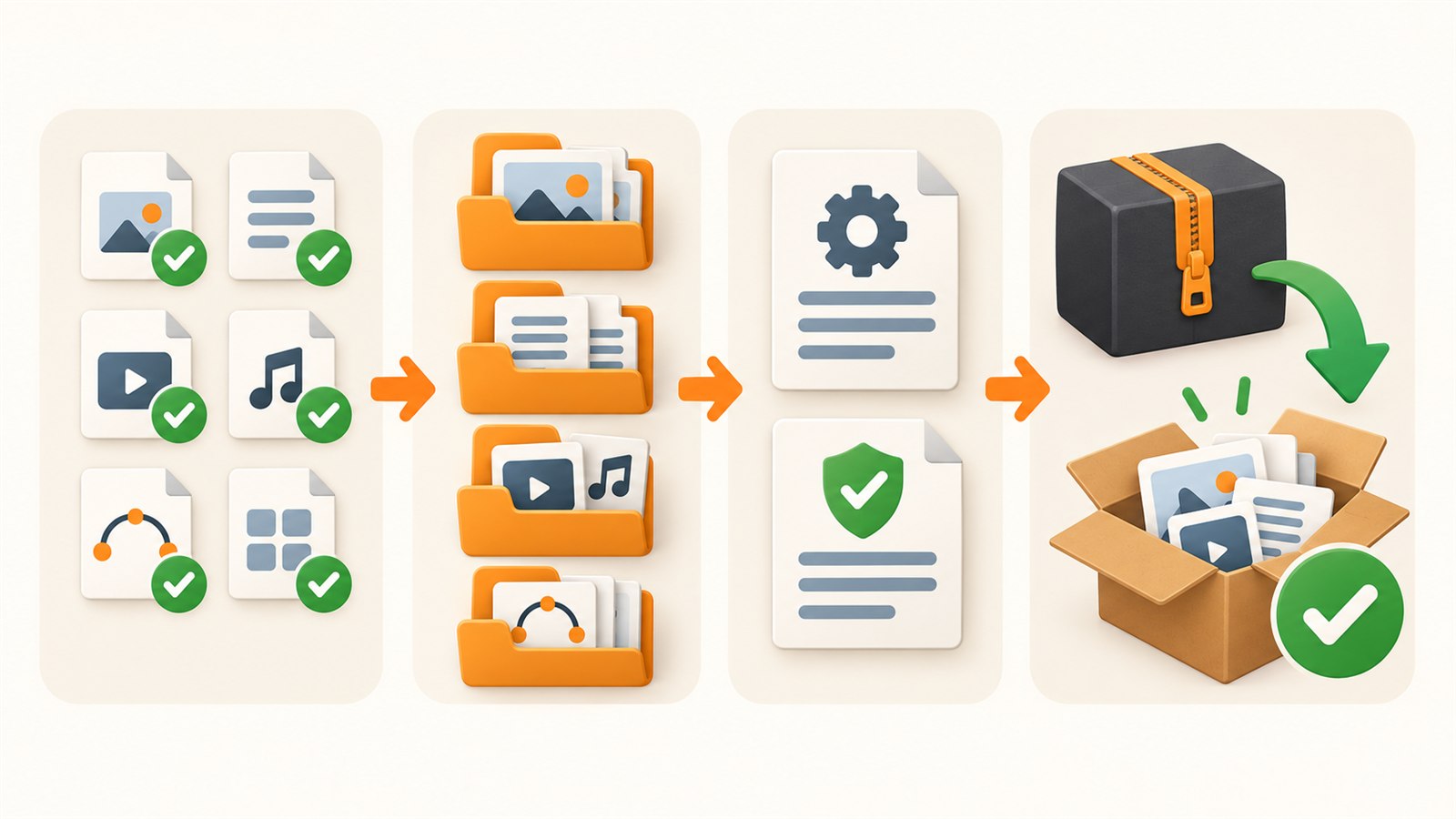
Check the delivery copies first, add clear navigation, then review the extracted archive from the buyer’s point of view.
A quick review table
| Problem | Likely cause | Practical check |
|---|---|---|
| It is unclear where to start | No obvious main file or README | Extract the ZIP into a new folder and find the first step without hints |
| Several files seem almost identical | Working versions were included | Compare the contents with the delivery list and remove unclear duplicates |
| A buyer sees drafts | Source files and delivery copies were mixed | Build the ZIP only from a separate delivery folder |
| Variants sort in a strange order | Filenames follow no consistent pattern | Add meaningful names and ordered numbering |
| Terms differ from the listing | A licence was reused from another product | Compare the text with the current product before publishing |
What a package should not promise
A clear ZIP cannot guarantee that every file will open in every program, produce the same result on every device or work with every material. File formats, application versions, printing and cutting settings all differ. Your responsibility is to deliver checked files and explain their purpose honestly; buyers still need to check their own applications and workflows.
The archive should not be the only copy of your work either. Keep safe originals and a clearly named copy of the published delivery. That makes it possible to confirm what was sent, prepare an update or rebuild a file without losing the source materials.
Frequently asked questions
Does every format need its own folder inside the ZIP?
Not always. For a small product, folders can be unnecessary. Use them when they help a buyer distinguish file types or variants, not to create a complicated structure.
Should editable source files be included?
Only when they are an intentional part of the product. Do not add source files automatically; they may include notes, unused layers or materials not meant for the buyer.
How is a README different from the product description?
The listing helps a person decide whether to buy. The README helps after the purchase by explaining the archive contents, the first step and file locations.
Should I open the finished ZIP every time?
Yes. Extracting it to an empty folder is a short final check that can reveal a missing instruction, unclear name, empty export or extra folder before publication.
How many files can one package contain?
As many as are needed for a clear delivery and permitted by the tools and platforms you use. Structure and verified content matter more than raw file count.
Is renaming files enough to make the package clear?
No. Names matter, but they do not replace checked files, a simple README and a buyer-style review of the extracted archive.
Next practical step
Take one product you already sell. Make a short delivery list, build a separate buyer folder, add a README and extract the completed ZIP into a new empty location. Every point that is unclear without your working folder is a useful improvement to make before the next update.
Keep learning
Choose another practical guide or return to the tools for the next step.